
Goal: To set up the Microsoft SharePoint integration for MySolution Recruitment so documents can be generated and saved to SharePoint.
Audience: System Admin
Overview
Salesforce doesn't offer document editing. If you are used to Microsoft Word and you want to edit Word Documents stored in Salesforce, you need to store them in Sharepoint. This document will help you setting up SharePoint integration in Mysolution Recruitment.
Prerequisites
Have a Microsoft Azure environment, and have Sharepoint.
Schema Sharepoint setup and document download
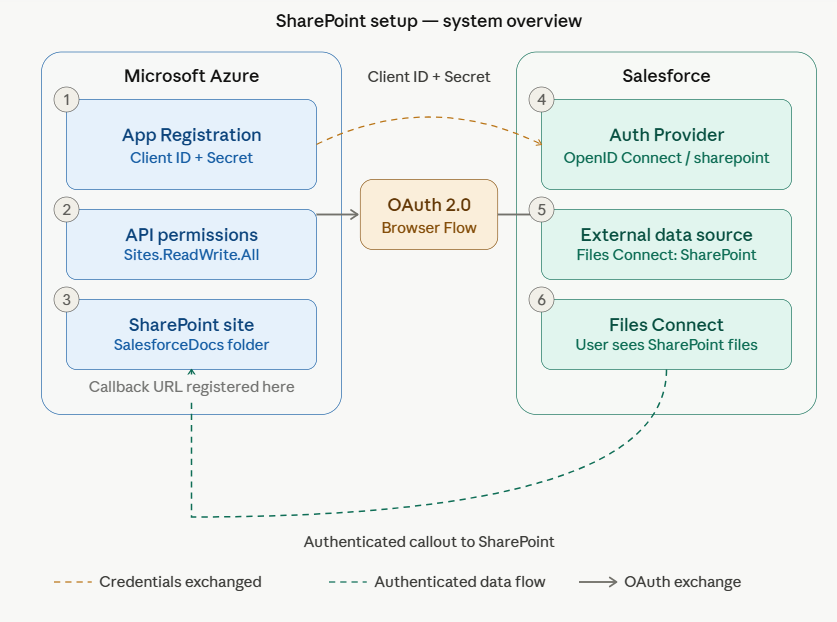
Schema 1 shows how your Salesforce environment and Microsoft SharePoint are connected. Once this connection is in place, documents generated in Salesforce can automatically be saved to SharePoint and users can access them from both platforms.
To make this work, two things need to be set up. On the Microsoft side, SharePoint needs to be told that Salesforce is allowed to access it. This is done by registering Salesforce as a trusted app in Microsoft Azure. As part of that registration, a unique key and password are generated and these are later handed over to the Salesforce configuration so both systems can recognise each other.
On the Salesforce side, those keys are entered so Salesforce knows how to identify itself when connecting to SharePoint. A link to the correct SharePoint location is then set up, and users are given access to see and work with SharePoint files directly from within Salesforce.
The first time a user accesses SharePoint through Salesforce, a Microsoft login screen will appear. After logging in, the connection is remembered and the user will not be asked again until the credentials expire.
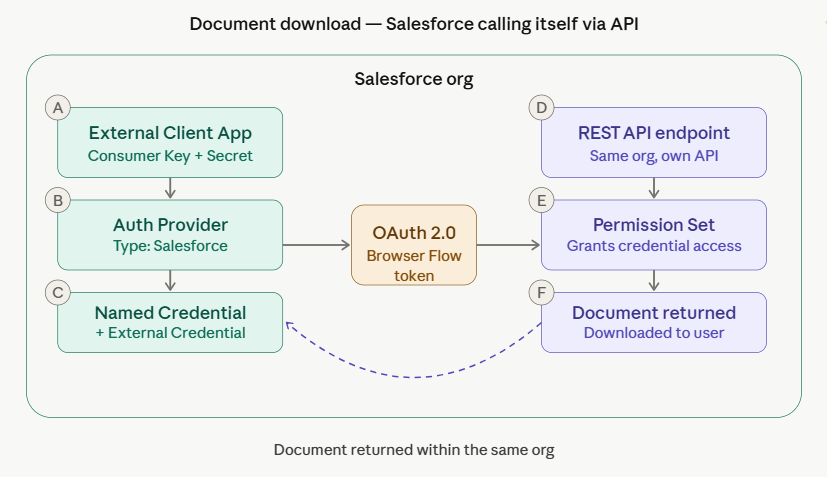
Schema 2 shows what happens behind the scenes when a user downloads a document from Salesforce.
When a download is triggered, Salesforce does not simply grab the file directly. Instead, it sends a secure request through its own built-in API, a kind of internal messenger, to fetch the document in a controlled and safe way. Before the request goes through, Salesforce checks whether the user has the right permissions to access that document. If they do, the document is retrieved and delivered to the user.
Next Steps